About this ebook
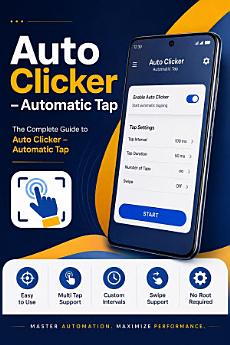
Are you tired of performing repetitive taps, tedious swipes, and manual screen clicks on your Android device? Auto Clicker – Automatic Tap: Professional User Guide & Complete Masterclass is the ultimate blueprint designed to help you transform your Android smartphone or tablet into an automated productivity powerhouse.
Authored by Jaish Kumar and published by Mindroot Publications (2026 Edition), this comprehensive guide walks you through every single feature, workflow, setup configuration, and hidden setting of the popular Auto Clicker – Automatic Tap utility developed by True Developers Studio.
------------------------------------------------------------
🚀 What You Will Learn Inside This Complete Guide:
------------------------------------------------------------
1. Introduction & Core Functionality
Gain a complete technical understanding of how Auto Clicker operates on modern Android systems. Learn the exact difference between single-target taps, multi-target sequences, and continuous swipe gestures.
2. Device Compatibility & Safe Permission Setup
Step-by-step instructions for enabling Android Accessibility Services and overlay permissions across Android 7.0 (Nougat) up to the latest Android 15+. Learn how to resolve permission revokation and keep your background automation active without crashing.
3. Mastering the Floating Control Panel
Explore every icon, control button, and configuration window on the floating overlay panel. Learn how to add, position, resize, lock, and minimize action targets effortlessly while performing tasks.
4. Single-Point & Multi-Point Gesture Automation
Construct complex multi-step automation scripts! Position multiple action targets on precise screen coordinates, configure custom tap order, and create smooth horizontal/vertical swipe movements for automated scrolling.
5. Precision Timing, Interval Controls & Anti-Detection
Fine-tune click delays down to milliseconds, seconds, or minutes! Learn how to customize target duration, execution cycle limits, and continuous loop timers to maximize efficiency while maintaining screen safety.
6. Saving, Importing & Exporting Custom Profiles
Never lose your custom automation setups again! Learn how to save named automation profiles, export configurations for backup, and import presets across different devices.
7. Data Safety, Privacy & Security Best Practices
Understand the Google Play Data Safety standards. Discover why Accessibility permissions are required, how local device data is kept completely private, and how to use automation responsibly.
8. Advanced Troubleshooting & Error Resolution
Instant fixes for common problems including floating panel disappearing, accessibility service turning off automatically, click desynchronization, and battery saver background stops.
9. Quick Reference Guide, FAQ & Technical Glossary
Includes a handy quick-reference cheat sheet for instant setup, answers to top user questions, and a complete glossary of automation terminology (Action Points, Milliseconds, Overlay, Target Delay, Cycle Count).
------------------------------------------------------------
🎯 Who Is This Book For?
------------------------------------------------------------
• Mobile Gamers: Automate repetitive grinding, resource farming, and tapping tasks safely.
• Productivity Enthusiasts: Streamline multi-step routine tasks, automated testing, and screen refreshing.
• App Testers & QA Engineers: Simulate user screen interactions and multi-touch gestures automatically.
• Everyday Android Users: Save time, reduce physical finger fatigue, and prolong your device touch screen lifespan.
------------------------------------------------------------
Take your Android automation skills to the next level today! Grab your copy now and master Auto Clicker in minutes.
Discover more
Ratings and reviews

- Flag inappropriate

- Flag inappropriate