About this ebook
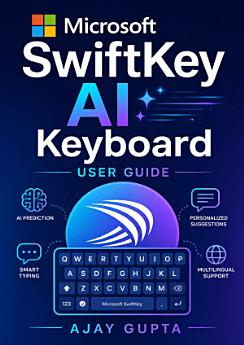
Unlock the full potential of Microsoft SwiftKey with the Microsoft SwiftKey AI Keyboard User Guide by Ajay Gupta. Whether you are new to SwiftKey or looking to master its advanced tools, this practical guide explains how to install, customize, and use the AI-powered keyboard across compatible Android and iOS devices. Discover how to personalize keyboard themes, layouts, languages, and typing preferences for a faster, more comfortable experience. Learn how SwiftKey’s predictive text, autocorrect, emoji suggestions, stickers, GIFs, voice typing, clipboard tools, and multilingual support can improve everyday communication. The guide also introduces AI-enhanced features that can help you rewrite text, adjust tone, generate content, and communicate more effectively in messages, emails, social media posts, and professional conversations. Step-by-step instructions make it easy to manage permissions, sync settings, protect privacy, troubleshoot common problems, and get the most from SwiftKey’s smart typing technology. Clear explanations and practical tips help users of all experience levels type more accurately while saving time. Ideal for students, professionals, families, mobile users, and anyone interested in AI productivity tools, this SwiftKey keyboard guide turns a powerful app into an efficient daily communication assistant. Improve mobile typing, explore Microsoft SwiftKey AI features, and create a personalized keyboard experience with this accessible user manual.
Unlock the full potential of Microsoft SwiftKey with the Microsoft SwiftKey AI Keyboard User Guide by Ajay Gupta. Whether you are new to SwiftKey or looking to master its advanced tools, this practical guide explains how to install, customize, and use the AI-powered keyboard across compatible And...
Discover more
About the author
Ajay Gupta is a technology writer focused on creating clear, practical guides for everyday software, mobile applications, and digital productivity tools. His work helps readers understand useful features, customize their devices, and adopt emerging technologies with confidence. In the Microsoft SwiftKey AI Keyboard User Guide, Gupta presents accessible instructions and practical tips for improving mobile typing, communication, and AI-assisted productivity.
Ajay Gupta is a technology writer focused on creating clear, practical guides for everyday software, mobile applications, and digital productivity tools. His work helps readers understand useful features, customize their devices, and adopt emerging technologies with confidence. In the Microsoft S...
Rate this ebook
Tell us what you think.
Reading information
Smartphones and tablets
Install the Google Play Books app for Android and iPad/iPhone. It syncs automatically with your account and allows you to read online or offline wherever you are.
Laptops and computers
You can listen to audiobooks purchased on Google Play using your computer's web browser.
eReaders and other devices
To read on e-ink devices like Kobo eReaders, you'll need to download a file and transfer it to your device. Follow the detailed Help Center instructions to transfer the files to supported eReaders.