
Business Calendar Pro

star
34.7K reviews

PEGI 3
info
500K+
Downloads


About this app
Business Calendar Pro has everything you need in a calendar app: It provides an excellent overview of your appointments, it’s easy to use and it gives you powerful tools to create and manipulate your events.
★ "Our favorite calendar app on Android, due to its flexibility and ease of use." - Lifehacker 01/2014 ★
★ "One of the best Calendar Apps for 2014" - FastCompany ★
Features
▪ Quick Day View: for a fast overview of all events of the day
▪ Favorite Bar: for direct access to all your calendars
▪ smooth scroll and zoom: for better, intuitive interaction
Customization down to the last detail
▪ adapt all views & widgets to your liking
▪ individual reminders with vibration, sounds, repetitions, intervals, LED
▪ adjustable font sizes for the app & widgets
Details
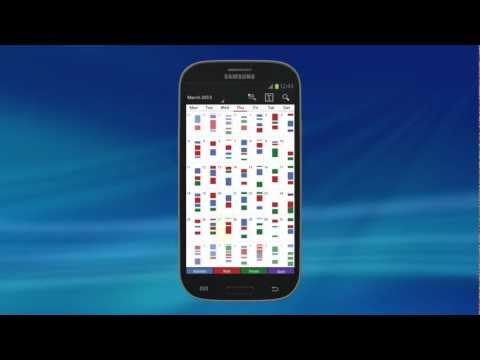
▪ month, week, day, agenda and event view
▪ color-coded year view
▪ scroll- and zoomable multi-day view (1-14 days)
▪ easy switching between timeline bars and event titles in month view
▪ search function
▪ sync your events with Google Calendar, Microsoft Outlook, Exchange etc. using the Android calendar synchronization
▪ professional widgets for month, week, agenda and day view
▪ intuitive handling: just move your finger over some days of interest in month view to open them in multi-day view
▪ many options for recurrent events (e.g. an event that takes place every other week on Tuesday and Thursday)
▪ birthday calendar
▪ context-sensitive help system to optimize your workflow
Additional features in this pro version
▪ manage contacts: link contacts to your events
▪ customizable templates: create your own templates for new events
▪ multi-selection: delete, move or copy multiple events at once
▪ drag&drop: move and copy events easily in the multi-day view
▪ tasks add-on: use the integrated task-management tool to sync with Google Tasks & Toodledo
▪ notifications: comprehensive reminder functionality
▪ app theming: light and dark theme for the app
▪ advanced widgets: set colors, font sizes and individual calendars
▪ import & export: quickly import or export all your calendars in .ics format
We also offer a free, ad-supported version of Business Calendar, which we kindly advise you to test for the functionality and the general workflow of the app! We hope that in the long term the pro version result as indispensable for you if you use your mobile calendar regularly.
★ "Our favorite calendar app on Android, due to its flexibility and ease of use." - Lifehacker 01/2014 ★
★ "One of the best Calendar Apps for 2014" - FastCompany ★
Features
▪ Quick Day View: for a fast overview of all events of the day
▪ Favorite Bar: for direct access to all your calendars
▪ smooth scroll and zoom: for better, intuitive interaction
Customization down to the last detail
▪ adapt all views & widgets to your liking
▪ individual reminders with vibration, sounds, repetitions, intervals, LED
▪ adjustable font sizes for the app & widgets
Details
▪ month, week, day, agenda and event view
▪ color-coded year view
▪ scroll- and zoomable multi-day view (1-14 days)
▪ easy switching between timeline bars and event titles in month view
▪ search function
▪ sync your events with Google Calendar, Microsoft Outlook, Exchange etc. using the Android calendar synchronization
▪ professional widgets for month, week, agenda and day view
▪ intuitive handling: just move your finger over some days of interest in month view to open them in multi-day view
▪ many options for recurrent events (e.g. an event that takes place every other week on Tuesday and Thursday)
▪ birthday calendar
▪ context-sensitive help system to optimize your workflow
Additional features in this pro version
▪ manage contacts: link contacts to your events
▪ customizable templates: create your own templates for new events
▪ multi-selection: delete, move or copy multiple events at once
▪ drag&drop: move and copy events easily in the multi-day view
▪ tasks add-on: use the integrated task-management tool to sync with Google Tasks & Toodledo
▪ notifications: comprehensive reminder functionality
▪ app theming: light and dark theme for the app
▪ advanced widgets: set colors, font sizes and individual calendars
▪ import & export: quickly import or export all your calendars in .ics format
We also offer a free, ad-supported version of Business Calendar, which we kindly advise you to test for the functionality and the general workflow of the app! We hope that in the long term the pro version result as indispensable for you if you use your mobile calendar regularly.
Professional calendar app for Google Calendar, MS Outlook & Exchange
Updated on
Safety starts with understanding how developers collect and share your data. Data privacy and security practices may vary based on your use, region, and age. The developer provided this information and may update it over time.
- No data shared with third partiesLearn more about how developers declare sharing
- No data collectedLearn more about how developers declare collection


Ratings and reviews
32.2K reviews

Kevin
- Flag inappropriate
September 15, 2026
Best Calendar by far, no sneaky ads, no data gathering and highly customisable
1 person found this review helpful

NJ Linda E.
- Flag inappropriate
May 16, 2026
Mostly very good but for foreign characters. I use this calendar all the time. But twice now I hit something that changes the characters to foreign ones that I can't read. Kanji? Anyway, I can't find what to do to go back to English because I don't read "Kanji". If I delete & reinstall, I am afraid I will lose all my appointments and events.
2 people found this review helpful

Abubakar Animiokhali
- Flag inappropriate
August 4, 2023
I've been using this calendar since 2009. It's the first application I usually upload on any new phone I am using. It's what it claims to be. The accuracy in reminder is great. My major issue with it is that whenever you uploaded it on a new phone, it doesn't recover most of your saved schedules, they get lost and where you have no hard copy backup, you are thrown into confusion. The developers should improve on it so that it has the ability to recover all saved schedules.
12 people found this review helpful
What’s new
- adaptations for newer Android versions
- bug fixes
- bug fixes
App support
About the developer
Appgenix Software UG (haftungsbeschränkt)
support@appgenix-software.com
Schönhauser Allee 48
10437 Berlin
Germany
+49 30 75549629


