
Cast to TV & Screen Mirroring
Contains adsIn-app purchases

star
209K reviews

PEGI 3
info
10M+
Downloads

PEGI 3
Learn more


About this app
Ever wished your phone screen could instantly appear on your TV?
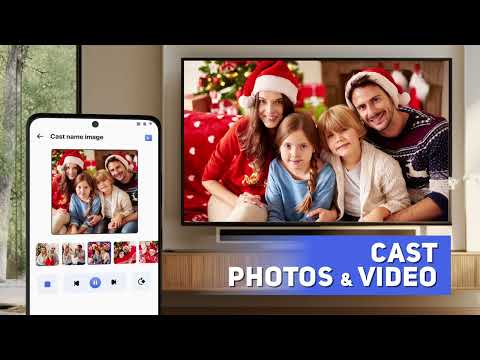
Cast to TV & Screen Mirroring lets you easily mirror your phone screen to TV and stream videos, photos, music, apps, and games wirelessly. Whether you’re watching movies, sharing memories, or presenting your work, turning your phone into a big-screen experience has never been easier.
With fast and stable screen mirroring, you can connect your phone to TV without cables or extra hardware. Cast to TV & Screen Mirroring is designed to deliver smooth performance, low latency, and clear display quality on most smart TVs.
🌟 Enjoy Everything from Your Phone on TV:
- Mirror your phone screen to TV in real time.
- Stream videos, photos, music, and apps to a larger display.
- Share games, presentations, and documents instantly.
- Control playback, volume, and navigation directly from your phone.
- Experience wireless screen sharing with minimal delay.
Whether at home or at work, phone to TV mirroring makes content sharing simple and intuitive.
📺 Works with Most Smart TVs & Streaming Devices:
Chromecast.
Roku TV.
Amazon Fire TV / Fire Stick.
Xbox.
Samsung.
LG.
Sony.
Hisense.
Panasonic.
TCL and other smart TVs.
AirPlay TV and DLNA-supported devices.
The app automatically detects nearby TVs on the same Wi-Fi network, ensuring a quick and secure connection every time.
🚀 Easy Setup – Start in 3 Simple Steps:
Step 01: Connect your phone and TV to the same Wi-Fi network.
Step 02: Open Cast to TV & Screen Mirroring.
Step 03: Select your TV to start mirroring or streaming.
No cables, no complicated settings — just instant phone to TV sharing.
💡 Why Choose Cast to TV & Screen Mirroring?
- Fast and stable wireless screen mirroring.
- Smooth performance for videos, games, and apps.
- No additional devices or setup required.
- Optimized for most smart TV brands and streaming platforms.
- Ideal for entertainment, sharing, and professional presentations.
Turn your phone into a powerful entertainment hub and enjoy everything on a bigger screen, anytime you want.
⚠️ DISCLAIMER:
This app is not affiliated with Google Chromecast, Roku, Amazon Fire TV, Samsung, LG, Sony, Hisense, Panasonic, TCL, AirPlay, or any other mentioned brands.
Cast to TV & Screen Mirroring lets you easily mirror your phone screen to TV and stream videos, photos, music, apps, and games wirelessly. Whether you’re watching movies, sharing memories, or presenting your work, turning your phone into a big-screen experience has never been easier.
With fast and stable screen mirroring, you can connect your phone to TV without cables or extra hardware. Cast to TV & Screen Mirroring is designed to deliver smooth performance, low latency, and clear display quality on most smart TVs.
🌟 Enjoy Everything from Your Phone on TV:
- Mirror your phone screen to TV in real time.
- Stream videos, photos, music, and apps to a larger display.
- Share games, presentations, and documents instantly.
- Control playback, volume, and navigation directly from your phone.
- Experience wireless screen sharing with minimal delay.
Whether at home or at work, phone to TV mirroring makes content sharing simple and intuitive.
📺 Works with Most Smart TVs & Streaming Devices:
Chromecast.
Roku TV.
Amazon Fire TV / Fire Stick.
Xbox.
Samsung.
LG.
Sony.
Hisense.
Panasonic.
TCL and other smart TVs.
AirPlay TV and DLNA-supported devices.
The app automatically detects nearby TVs on the same Wi-Fi network, ensuring a quick and secure connection every time.
🚀 Easy Setup – Start in 3 Simple Steps:
Step 01: Connect your phone and TV to the same Wi-Fi network.
Step 02: Open Cast to TV & Screen Mirroring.
Step 03: Select your TV to start mirroring or streaming.
No cables, no complicated settings — just instant phone to TV sharing.
💡 Why Choose Cast to TV & Screen Mirroring?
- Fast and stable wireless screen mirroring.
- Smooth performance for videos, games, and apps.
- No additional devices or setup required.
- Optimized for most smart TV brands and streaming platforms.
- Ideal for entertainment, sharing, and professional presentations.
Turn your phone into a powerful entertainment hub and enjoy everything on a bigger screen, anytime you want.
⚠️ DISCLAIMER:
This app is not affiliated with Google Chromecast, Roku, Amazon Fire TV, Samsung, LG, Sony, Hisense, Panasonic, TCL, AirPlay, or any other mentioned brands.
Mirror phone to TV wirelessly. Cast to TV easily, videos, photos & smart TVs.
Updated on
Safety starts with understanding how developers collect and share your data. Data privacy and security practices may vary based on your use, region, and age. The developer provided this information and may update it over time.


Ratings and reviews
202K reviews

Chris Owen
- Flag inappropriate
August 23, 2026
total rubbish don't waste your time. I am not against ads but if one cannot use the product because of ads then it is absolutely garbage. after I was forced to watch multiple video ads still it's a total rubbish..
36 people found this review helpful

Leon Van Rooyen
- Flag inappropriate
August 21, 2026
I deleted this rubbish, was ok with 1 add now its intrusive. Got better alternative. Side Note: an intrusive add will NEVER get be to buy or download anything EVER
7 people found this review helpful

Louise Allaire
- Flag inappropriate
July 6, 2026
July 6, 2026 This is a copied review, I have the same problem as this person they won't answer our questions or refund... Dubscribed and it did not work. Immediately canceled but the annual payment was already made. Tried to ask for a refund but the communication was not working. Super frustrating. I just want a refund since I purchased less than a hour ago and didn't even use the app function.
16 people found this review helpful
PEGI 3
Learn moreApp support
About the developer
Begamob Global Limited
info@begamob.com
Rm 308 3/F CHEVALIER HSE
45-51 CHATHAM RD S
尖沙咀
九龍
Hong Kong
+84 985 369 578


