
Bottom Quick Settings
Ilova ichida xaridlar

star
12,4 ming ta sharh

3+
info
1 mln+
Yuklanmalar


Bu ilova haqida
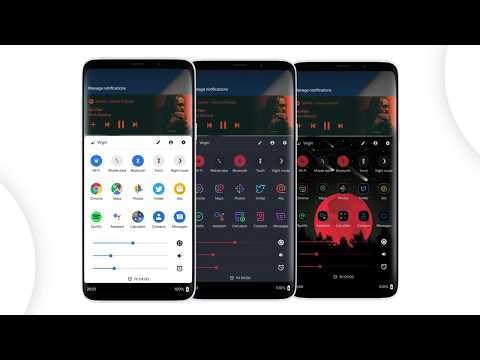
Bottom Quick Settings moves your notification shade and quick settings panel to the bottom of your Android screen — one-handed access to 40+ controls, right where your thumb reaches.
Swipe up from a customizable trigger anywhere on screen and your quick settings panel opens instantly at the bottom. Toggle WiFi, Bluetooth, brightness, volume, and dozens more with just your thumb.
NOTIFICATION SHADE
- Full notification panel relocated to the bottom of your screen
- Reply, open, dismiss, interact and manage all notifications
- Full color customization
- Dynamic colors
BOTTOM STATUS BAR
- Move your device's status bar to the bottom of the screen
- All notification and system icons — now within thumb reach
- Full color personalization
- Blacklist: auto-hide the status bar in specific apps
QUICK SETTING TILES — 40+ CONTROLS
- WiFi, Bluetooth, Mobile Data, Location, Torch, NFC and 35 more
- Add any app or website as a custom shortcut tile
- Adjust the grid: change rows and columns to fit your style
- Built-in sliders: screen brightness, media, ringtone, alarm and notification volume
SWIPE TRIGGER HANDLE
- Place it anywhere along the screen edge
- Fully adjustable size — never conflicts with navigation gestures
- Auto-hide in fullscreen and landscape
- Blacklist: hide the trigger handle in specific apps
CUSTOMIZATION
- Blur the quick settings panel background
- Custom colors for the panel background and quick setting icons
- Add a background image to the panel
- App icon pack support
- Match navigation bar color to the panel footer
- Dark mode
- Tasker integration for automation
BACKUP / RESTORE
- Save and restore your full customization setup
- Share your themes with other users
ROOT / ADB POWER FEATURES
- Toggle Mobile Data, Location and other secure system settings
- One-time ADB command unlocks Android-restricted controls — no root required
Android's quick settings shouldn't be stuck at the top of a large screen. Bottom Quick Settings puts your notification shade, status bar, and quick settings panel exactly where your thumb reaches — all in one swipe.
Bottom Quick Settings uses Accessibility Services to display the custom quick settings and notification panel on your screen.
Swipe up from a customizable trigger anywhere on screen and your quick settings panel opens instantly at the bottom. Toggle WiFi, Bluetooth, brightness, volume, and dozens more with just your thumb.
NOTIFICATION SHADE
- Full notification panel relocated to the bottom of your screen
- Reply, open, dismiss, interact and manage all notifications
- Full color customization
- Dynamic colors
BOTTOM STATUS BAR
- Move your device's status bar to the bottom of the screen
- All notification and system icons — now within thumb reach
- Full color personalization
- Blacklist: auto-hide the status bar in specific apps
QUICK SETTING TILES — 40+ CONTROLS
- WiFi, Bluetooth, Mobile Data, Location, Torch, NFC and 35 more
- Add any app or website as a custom shortcut tile
- Adjust the grid: change rows and columns to fit your style
- Built-in sliders: screen brightness, media, ringtone, alarm and notification volume
SWIPE TRIGGER HANDLE
- Place it anywhere along the screen edge
- Fully adjustable size — never conflicts with navigation gestures
- Auto-hide in fullscreen and landscape
- Blacklist: hide the trigger handle in specific apps
CUSTOMIZATION
- Blur the quick settings panel background
- Custom colors for the panel background and quick setting icons
- Add a background image to the panel
- App icon pack support
- Match navigation bar color to the panel footer
- Dark mode
- Tasker integration for automation
BACKUP / RESTORE
- Save and restore your full customization setup
- Share your themes with other users
ROOT / ADB POWER FEATURES
- Toggle Mobile Data, Location and other secure system settings
- One-time ADB command unlocks Android-restricted controls — no root required
Android's quick settings shouldn't be stuck at the top of a large screen. Bottom Quick Settings puts your notification shade, status bar, and quick settings panel exactly where your thumb reaches — all in one swipe.
Bottom Quick Settings uses Accessibility Services to display the custom quick settings and notification panel on your screen.
Quick settings panel & notification shade at the bottom of the screen
Oxirgi yangilanish
Xavfsizlik — dastur ishlab chiquvchilar maʼlumotlaringizni qanday jamlashi va ulashishini tushunishdan boshlanadi. Maʼlumotlar maxfiyligi va xavfsizlik amaliyotlari ilovadan foydalanish, hudud va yoshga qarab farq qilishi mumkin. Bu axborot dastur ishlab chiquvchi tomonidan taqdim etilgan va keyinchalik yangilanishi mumkin.
- Tashqi hamkorlarga hech qanday axborot ulashilmaganDastur ishlab chiquvchilar axborot ulashilishini qanday aytishi haqida batafsil
- Hech qanday maʼlumot jamlanmaganDastur ishlab chiquvchilar axborot jamlanishini qanday aytishi haqida batafsil
- Maʼlumotlar uzatish vaqtida shifrlanadi
- Maʼlumotlarni oʻchirishni soʻrashingiz mumkin


Reytinglar va sharhlar
12 ming ta sharh

Shukurjon Tokhirov
- Nomaqbul deb belgilash
15-iyun, 2020
Zoʻe
10 kishi bu sharhni foydali deb topgan

Google foydalanuvchisi
- Nomaqbul deb belgilash
5-aprel, 2019
zo'r
7 kishi bu sharhni foydali deb topgan

Fusyu Dammahum
- Nomaqbul deb belgilash
22-dekabr, 2025
ℍ𝕒𝕞𝕞𝕒 𝕚𝕝𝕠𝕧𝕒𝕝𝕒𝕣𝕚𝕟𝕘𝕚𝕫𝕟𝕚 𝕠𝕣𝕟𝕒𝕥𝕘𝕒𝕟𝕞𝕒𝕟 𝚋𝚘𝚝𝚝𝚘𝚖 𝚀𝚞𝚒𝚌𝚔 𝚜𝚎𝚝𝚝𝚒𝚗𝚐𝚍𝚊𝚗 𝚔𝚘𝚛𝚊 爪|ㄩ| |千ㄩ ꌦꋬꉧꇙꁝ꒐ꋪꄲꆰ
1 kishi bu sharhni foydali deb topgan
Nima yangiliklar
Bug fixes and enhancements
Ilova yuzasidan yordam
Dasturchi haqida
Thomas Bayley
support@tombayley.dev
31 Glastonbury Drive
POYNTON
SK12 1EN
United Kingdom


