
WristCapture: Phone Screenshot
Achats via l'appli


PEGI 3
info
10+
Téléchargements

PEGI 3
En savoir plus


À propos de l'application
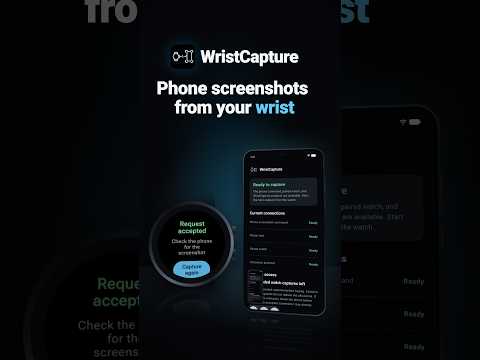
Request a normal Android phone screenshot from your wrist without reaching for Power + Volume Down. WristCapture connects a Wear OS watch to its paired Android phone and asks Android to run its built-in screenshot action after a deliberate WristCapture action.
ACCESSIBILITY SERVICE USE
WristCapture uses Android's AccessibilityService API only for its core screenshot-request feature. After an in-app prominent disclosure and your affirmative consent, the service can invoke Android's built-in global Take screenshot action when you run the phone compatibility test or deliberately request a capture from the paired Wear OS watch.
WristCapture is not an accessibility tool. It does not read screen text, inspect accessibility nodes or other apps, perform general clicking, typing, or navigation, receive screenshot pixels, browse your gallery, or upload screenshot content. No screen content or screenshot data is collected or shared through the AccessibilityService. Android creates and stores the screenshot. You can disable WristCapture's Accessibility Service at any time in Android Accessibility settings.
TEST COMPATIBILITY FIRST
The phone companion guides you through:
* the AccessibilityService disclosure and consent step
* service, screen, lock, and paired-watch readiness checks
* phone/watch protocol compatibility
* a free phone-side screenshot compatibility test
* privacy and compatibility information
* Google Play purchase and restore
Compatibility can vary by phone, watch, Android version, firmware, region, and the screen being captured.
CAPTURE FROM WEAR OS
Request a phone screenshot from:
* the WristCapture watch app's Capture button
* the WristCapture Tile
* the WristCapture watch-face complication
A normal app-launcher open is navigation, not a capture command. Supported watch-system shortcuts may open WristCapture, but the manual Capture button is still required. WristCapture does not continuously monitor gestures.
TEN WATCH CAPTURES INCLUDED
WristCapture includes ten accepted watch-originated captures before Lifetime Pro is required. Only a command accepted by the phone consumes the allowance. Failed, stale, duplicate, rate-limited, screen-off, locked-phone, disconnected, incompatible, rejected, or internal-failure attempts do not consume an included capture.
PRIVACY-FOCUSED
WristCapture does not:
* receive screenshot images or thumbnails
* read screen text or accessibility node content
* identify the foreground app
* browse gallery or screenshot file paths
* request photo or storage permissions
* upload, analyze, edit, retain, or share screenshots
* use ads, developer analytics, accounts, or a developer backend
Phone-watch messages contain only operational command/status, compatibility, entitlement, remaining-allowance, and watch-setting data needed for the feature. Screenshot content and payment credentials are not sent to the watch.
REQUIREMENTS AND LIMITATIONS
* Requires a compatible Android phone and paired Wear OS watch
* Phone should be awake, screen-on, and unlocked
* Android and individual apps may block or blank protected screens
* WristCapture does not bypass screenshot restrictions
* An accepted command does not guarantee every screen produced a usable stored screenshot
* iPhone is not supported
LIFETIME PRO
After the ten included watch captures, one Lifetime Pro purchase removes the allowance. The purchase is processed by Google Play. There is no subscription and no advertising. The app displays the localized price supplied by Google Play and supports purchase restore.
ACCESSIBILITY SERVICE USE
WristCapture uses Android's AccessibilityService API only for its core screenshot-request feature. After an in-app prominent disclosure and your affirmative consent, the service can invoke Android's built-in global Take screenshot action when you run the phone compatibility test or deliberately request a capture from the paired Wear OS watch.
WristCapture is not an accessibility tool. It does not read screen text, inspect accessibility nodes or other apps, perform general clicking, typing, or navigation, receive screenshot pixels, browse your gallery, or upload screenshot content. No screen content or screenshot data is collected or shared through the AccessibilityService. Android creates and stores the screenshot. You can disable WristCapture's Accessibility Service at any time in Android Accessibility settings.
TEST COMPATIBILITY FIRST
The phone companion guides you through:
* the AccessibilityService disclosure and consent step
* service, screen, lock, and paired-watch readiness checks
* phone/watch protocol compatibility
* a free phone-side screenshot compatibility test
* privacy and compatibility information
* Google Play purchase and restore
Compatibility can vary by phone, watch, Android version, firmware, region, and the screen being captured.
CAPTURE FROM WEAR OS
Request a phone screenshot from:
* the WristCapture watch app's Capture button
* the WristCapture Tile
* the WristCapture watch-face complication
A normal app-launcher open is navigation, not a capture command. Supported watch-system shortcuts may open WristCapture, but the manual Capture button is still required. WristCapture does not continuously monitor gestures.
TEN WATCH CAPTURES INCLUDED
WristCapture includes ten accepted watch-originated captures before Lifetime Pro is required. Only a command accepted by the phone consumes the allowance. Failed, stale, duplicate, rate-limited, screen-off, locked-phone, disconnected, incompatible, rejected, or internal-failure attempts do not consume an included capture.
PRIVACY-FOCUSED
WristCapture does not:
* receive screenshot images or thumbnails
* read screen text or accessibility node content
* identify the foreground app
* browse gallery or screenshot file paths
* request photo or storage permissions
* upload, analyze, edit, retain, or share screenshots
* use ads, developer analytics, accounts, or a developer backend
Phone-watch messages contain only operational command/status, compatibility, entitlement, remaining-allowance, and watch-setting data needed for the feature. Screenshot content and payment credentials are not sent to the watch.
REQUIREMENTS AND LIMITATIONS
* Requires a compatible Android phone and paired Wear OS watch
* Phone should be awake, screen-on, and unlocked
* Android and individual apps may block or blank protected screens
* WristCapture does not bypass screenshot restrictions
* An accepted command does not guarantee every screen produced a usable stored screenshot
* iPhone is not supported
LIFETIME PRO
After the ten included watch captures, one Lifetime Pro purchase removes the allowance. The purchase is processed by Google Play. There is no subscription and no advertising. The app displays the localized price supplied by Google Play and supports purchase restore.
Request phone screenshots from your Wear OS watch after a compatibility test.
Date de mise à jour
La sécurité, c'est d'abord comprendre comment les développeurs collectent et partagent vos données. Les pratiques concernant leur confidentialité et leur protection peuvent varier selon votre utilisation, votre région et votre âge. Le développeur a fourni ces informations et peut les modifier ultérieurement.


Nouveautés
Capture phone screenshots from your wrist with a refreshed experience.
• Redesigned phone app with light and dark themes.
• New Home, Access, Watch and Help tabs.
• Improved phone/watch connection recovery.
• New screenshot test to check setup without using capture credits.
• More reliable capture-request handling and protection against duplicate requests.
• Better stability and error handling across Android and Wear OS.
• Redesigned phone app with light and dark themes.
• New Home, Access, Watch and Help tabs.
• Improved phone/watch connection recovery.
• New screenshot test to check setup without using capture credits.
• More reliable capture-request handling and protection against duplicate requests.
• Better stability and error handling across Android and Wear OS.
PEGI 3
En savoir plusAssistance de l'appli
À propos du développeur
Quinn Favo
quazmoz@vivaldi.net
231 E Park Ave
State College, PA 16803-5415
United States


