
Executive Business Watch Face


PEGI 3
info
1+
Téléchargements

PEGI 3
En savoir plus


À propos de l'application
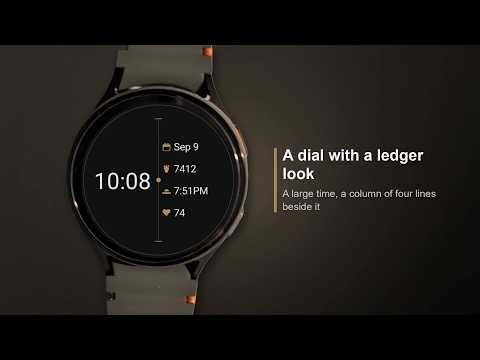
Executive-IOV is an elegant, customizable watch face for Wear OS. A digital dial with the look of a ledger: a large time, next to it a left-aligned column of four lines, each with its own icon in front.
The readings/metrics come from apps on your watch. The watch face only displays them, and with your watch's health and fitness app as well as a weather or calendar app there are more values to choose from.
These settings can be made either from the app or on the watch itself.
Setting them on the watch can cause trouble (metrics/data/complications pick their own tappable area) and those areas can overlap. In that case the settings have to be made from the app.
An illustrated step-by-step guide for both ways is here:
https://iovion.com/watchFaces/wearOs/settings
Features:
- Three complication slots: the three lower lines of the column; the first line carries the date, fixed
- Every slot takes any provider that delivers short text
- The icon in front of a line comes from the provider and therefore always describes what stands beside it
- Nothing to set up first: out of the box the column shows next appointment, sunset and heart rate
- Color settings with eighteen colors each plus an "As Designed" reset
- Always-on display: time and date stay visible, dimmed and centered — column and grid step back
- No permissions, no network access, no data collection
Requires Wear OS 4 or newer.
If you would like more to configure, leave a message via the contact form and we will add it.
The readings/metrics come from apps on your watch. The watch face only displays them, and with your watch's health and fitness app as well as a weather or calendar app there are more values to choose from.
These settings can be made either from the app or on the watch itself.
Setting them on the watch can cause trouble (metrics/data/complications pick their own tappable area) and those areas can overlap. In that case the settings have to be made from the app.
An illustrated step-by-step guide for both ways is here:
https://iovion.com/watchFaces/wearOs/settings
Features:
- Three complication slots: the three lower lines of the column; the first line carries the date, fixed
- Every slot takes any provider that delivers short text
- The icon in front of a line comes from the provider and therefore always describes what stands beside it
- Nothing to set up first: out of the box the column shows next appointment, sunset and heart rate
- Color settings with eighteen colors each plus an "As Designed" reset
- Always-on display: time and date stay visible, dimmed and centered — column and grid step back
- No permissions, no network access, no data collection
Requires Wear OS 4 or newer.
If you would like more to configure, leave a message via the contact form and we will add it.
Watch face with a ledger look for Wear OS — elegant, four values at a glance
Date de mise à jour
La sécurité, c'est d'abord comprendre comment les développeurs collectent et partagent vos données. Les pratiques concernant leur confidentialité et leur protection peuvent varier selon votre utilisation, votre région et votre âge. Le développeur a fourni ces informations et peut les modifier ultérieurement.
- Aucune donnée partagée avec des tiersEn savoir plus sur la manière dont les développeurs déclarent le partage
- Aucune donnée collectéeEn savoir plus sur la manière dont les développeurs déclarent la collecte


Nouveautés
2026-10-17 - 1.31
- New color "True Black": on AMOLED watches the background switches off completely, only the dial lights up
2026-09-29 - 1.30
- The date can now be shown or hidden
2026-09-21 - 1.24
- New color settings for Clock
2026-09-13 - 1.22
- Each data field can now be switched off in the settings
2026-09-09 - 1.03
- First release
- New color "True Black": on AMOLED watches the background switches off completely, only the dial lights up
2026-09-29 - 1.30
- The date can now be shown or hidden
2026-09-21 - 1.24
- New color settings for Clock
2026-09-13 - 1.22
- Each data field can now be switched off in the settings
2026-09-09 - 1.03
- First release
PEGI 3
En savoir plusAssistance de l'appli
À propos du développeur
Richard Junggebauer
support@iovion.com
Rendsburger Landstr. 148
24113 Kiel
Germany
+49 177 6456147


