
Bottom Quick Settings
In-App-Käufe

star
12.4 Tsg. Rezensionen

PEGI 3
info
1 Mio.+
Downloads


Über diese App
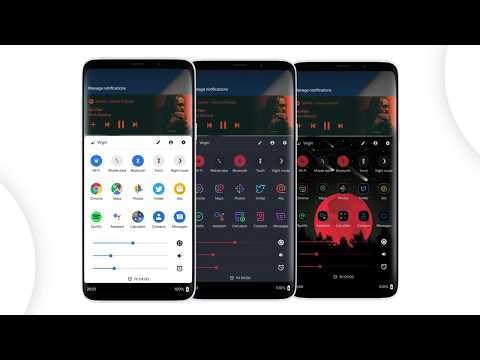
Bottom Quick Settings moves your notification shade and quick settings panel to the bottom of your Android screen — one-handed access to 40+ controls, right where your thumb reaches.
Swipe up from a customizable trigger anywhere on screen and your quick settings panel opens instantly at the bottom. Toggle WiFi, Bluetooth, brightness, volume, and dozens more with just your thumb.
NOTIFICATION SHADE
- Full notification panel relocated to the bottom of your screen
- Reply, open, dismiss, interact and manage all notifications
- Full color customization
- Dynamic colors
BOTTOM STATUS BAR
- Move your device's status bar to the bottom of the screen
- All notification and system icons — now within thumb reach
- Full color personalization
- Blacklist: auto-hide the status bar in specific apps
QUICK SETTING TILES — 40+ CONTROLS
- WiFi, Bluetooth, Mobile Data, Location, Torch, NFC and 35 more
- Add any app or website as a custom shortcut tile
- Adjust the grid: change rows and columns to fit your style
- Built-in sliders: screen brightness, media, ringtone, alarm and notification volume
SWIPE TRIGGER HANDLE
- Place it anywhere along the screen edge
- Fully adjustable size — never conflicts with navigation gestures
- Auto-hide in fullscreen and landscape
- Blacklist: hide the trigger handle in specific apps
CUSTOMIZATION
- Blur the quick settings panel background
- Custom colors for the panel background and quick setting icons
- Add a background image to the panel
- App icon pack support
- Match navigation bar color to the panel footer
- Dark mode
- Tasker integration for automation
BACKUP / RESTORE
- Save and restore your full customization setup
- Share your themes with other users
ROOT / ADB POWER FEATURES
- Toggle Mobile Data, Location and other secure system settings
- One-time ADB command unlocks Android-restricted controls — no root required
Android's quick settings shouldn't be stuck at the top of a large screen. Bottom Quick Settings puts your notification shade, status bar, and quick settings panel exactly where your thumb reaches — all in one swipe.
Bottom Quick Settings uses Accessibility Services to display the custom quick settings and notification panel on your screen.
Swipe up from a customizable trigger anywhere on screen and your quick settings panel opens instantly at the bottom. Toggle WiFi, Bluetooth, brightness, volume, and dozens more with just your thumb.
NOTIFICATION SHADE
- Full notification panel relocated to the bottom of your screen
- Reply, open, dismiss, interact and manage all notifications
- Full color customization
- Dynamic colors
BOTTOM STATUS BAR
- Move your device's status bar to the bottom of the screen
- All notification and system icons — now within thumb reach
- Full color personalization
- Blacklist: auto-hide the status bar in specific apps
QUICK SETTING TILES — 40+ CONTROLS
- WiFi, Bluetooth, Mobile Data, Location, Torch, NFC and 35 more
- Add any app or website as a custom shortcut tile
- Adjust the grid: change rows and columns to fit your style
- Built-in sliders: screen brightness, media, ringtone, alarm and notification volume
SWIPE TRIGGER HANDLE
- Place it anywhere along the screen edge
- Fully adjustable size — never conflicts with navigation gestures
- Auto-hide in fullscreen and landscape
- Blacklist: hide the trigger handle in specific apps
CUSTOMIZATION
- Blur the quick settings panel background
- Custom colors for the panel background and quick setting icons
- Add a background image to the panel
- App icon pack support
- Match navigation bar color to the panel footer
- Dark mode
- Tasker integration for automation
BACKUP / RESTORE
- Save and restore your full customization setup
- Share your themes with other users
ROOT / ADB POWER FEATURES
- Toggle Mobile Data, Location and other secure system settings
- One-time ADB command unlocks Android-restricted controls — no root required
Android's quick settings shouldn't be stuck at the top of a large screen. Bottom Quick Settings puts your notification shade, status bar, and quick settings panel exactly where your thumb reaches — all in one swipe.
Bottom Quick Settings uses Accessibility Services to display the custom quick settings and notification panel on your screen.
Quick settings panel & notification shade at the bottom of the screen
Aktualisiert am
Was die Sicherheit angeht, solltest du als Erstes verstehen, wie Entwickler deine Daten erheben und weitergeben. Die Datenschutz- und Sicherheitspraktiken können je nach deiner Verwendung, deiner Region und deinem Alter variieren. Diese Informationen wurden vom Entwickler zur Verfügung gestellt und können jederzeit von ihm geändert werden.
- Keine Daten werden mit Drittunternehmen oder -organisationen geteilt
- Keine Daten erhoben
- Daten werden bei der Übertragung verschlüsselt
- Du kannst das Löschen der Daten beantragen


Bewertungen und Rezensionen
12 Tsg. Rezensionen
Neuerungen
Bug fixes and enhancements
App-Unterstützung
Informationen zum Entwickler
Thomas Bayley
support@tombayley.dev
31 Glastonbury Drive
POYNTON
SK12 1EN
United Kingdom


