
Disk & Storage Analyzer [PRO]

star
1.78K reviews

PEGI 3
info
10K+
Downloads

PEGI 3
Learn more


About this app
DISK & STORAGE ANALYZER [PRO] displays information on sdcard, usb devices, external and internal storage in a simple and clear graphical form (infographics).
■ It's the MOST ADVANCED and INTERACTIVE DISK SPACE VISUALIZATION on Google Play.
■ “Finds lost cache files. It helps me to free up disk space by quickly finding and deleting big files.”
■ “This application is an essential addition to any file browser. it is very simple and convenient tool to search for files by size.”
● VISUALIZATION
Folders and Files are represented as a Sunburst chart and sorted by their size.
Сentral chart sector is a current directory. Its represented by a circle. The rest of the sector is the subfolders and files. Click on the sector and we go deeper. Application draws nested levels with a head of previously selected sector.
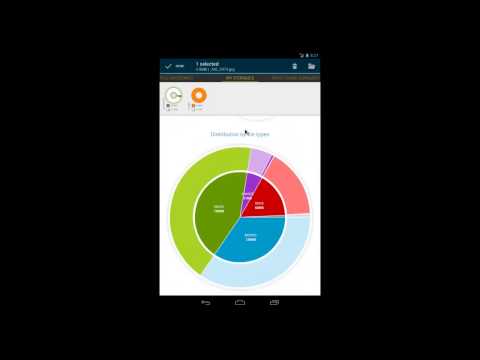
Disk & Storage Analyzer [PRO] displays mount points as a pie chart with a free and available space and the distribution of files by category (documents, images, videos, music, etc.) and extensions (for example, the distribution of the Music has subcategory mp3, wma, ogg, etc.)
Data on available storages taken from mount points of the vold.fstab file.
● STRONG SEARCH CAPABILITIES
All contents of the device is indexed at run. Full drive search can be done in a second. Founded files are displayed on the Quick Search page after entering a search query.
● FINDING BIG FILES EASILY
Global Top Ten largest files mode is available. Using this application you can easily clean up device and free a lot of space.
● INTUITIVE USER INTERFACE
User-friendly interface allows you quickly switch between modes and pages. Like Google Play application My Device Storage Analyser uses view pager.
Context Action Mode is now available for selected sectors (only for Anroid API 3.0 and higher). It's very simple to select files and perform operations on it.
You have the following pages in the application:
● FILE CATEGORIES. All files in internal and external storage, SD card or USB device are presented in a structured way:
By category (documents, videos, music, etc.)
By file size (large, large, medium, etc.).
By file date (today and yesterday, earlier this week, last week, earlier this month and etc)
● MY STORAGES page displays the summary statistics for available storage.
● DRIVE USAGE Sunburst is an Intuitive and effective way to display the data on the device. Simply drill-in and you will discover inner data universe.
● TOP 10 Files mode shows you where all the free space on the device has disappeared
● QUICK SEARCH mode shows the result of search or a content of a chosen category.
Clicking on the file shows context menu with a open or delete the document, discover its properties.
Long click on the category or extension will put contained files to the Quick Search page.
# Application is still in development, so there may be unexpected force closes. Better FEEDBACK than low rating. Thank you!
Try free version DISK & STORAGE ANALYZER first.
■ It's the MOST ADVANCED and INTERACTIVE DISK SPACE VISUALIZATION on Google Play.
■ “Finds lost cache files. It helps me to free up disk space by quickly finding and deleting big files.”
■ “This application is an essential addition to any file browser. it is very simple and convenient tool to search for files by size.”
● VISUALIZATION
Folders and Files are represented as a Sunburst chart and sorted by their size.
Сentral chart sector is a current directory. Its represented by a circle. The rest of the sector is the subfolders and files. Click on the sector and we go deeper. Application draws nested levels with a head of previously selected sector.
Disk & Storage Analyzer [PRO] displays mount points as a pie chart with a free and available space and the distribution of files by category (documents, images, videos, music, etc.) and extensions (for example, the distribution of the Music has subcategory mp3, wma, ogg, etc.)
Data on available storages taken from mount points of the vold.fstab file.
● STRONG SEARCH CAPABILITIES
All contents of the device is indexed at run. Full drive search can be done in a second. Founded files are displayed on the Quick Search page after entering a search query.
● FINDING BIG FILES EASILY
Global Top Ten largest files mode is available. Using this application you can easily clean up device and free a lot of space.
● INTUITIVE USER INTERFACE
User-friendly interface allows you quickly switch between modes and pages. Like Google Play application My Device Storage Analyser uses view pager.
Context Action Mode is now available for selected sectors (only for Anroid API 3.0 and higher). It's very simple to select files and perform operations on it.
You have the following pages in the application:
● FILE CATEGORIES. All files in internal and external storage, SD card or USB device are presented in a structured way:
By category (documents, videos, music, etc.)
By file size (large, large, medium, etc.).
By file date (today and yesterday, earlier this week, last week, earlier this month and etc)
● MY STORAGES page displays the summary statistics for available storage.
● DRIVE USAGE Sunburst is an Intuitive and effective way to display the data on the device. Simply drill-in and you will discover inner data universe.
● TOP 10 Files mode shows you where all the free space on the device has disappeared
● QUICK SEARCH mode shows the result of search or a content of a chosen category.
Clicking on the file shows context menu with a open or delete the document, discover its properties.
Long click on the category or extension will put contained files to the Quick Search page.
# Application is still in development, so there may be unexpected force closes. Better FEEDBACK than low rating. Thank you!
Try free version DISK & STORAGE ANALYZER first.
Device's storage information in a simple and clear graphical form (infographics)
Updated on
Safety starts with understanding how developers collect and share your data. Data privacy and security practices may vary based on your use, region and age. The developer provided this information and may update it over time.
- No data shared with third partiesLearn more about how developers declare sharing
- No data collectedLearn more about how developers declare collection


Ratings and reviews
1.58K reviews

JI C
- Flag inappropriate
6 October 2026
Was the best... after latest update, app does not keep choice drive color on widgets or inside app. reverts back & forth to generic & my colors. Should not have to update if it was working fine on my phone to begin with. Now it does not. Uninstalled after headache watching the updated version malfunction every time I use another app. Widgets are failing to stay functional.

ALFREDO EMILIO SEIMANDI
- Flag inappropriate
14 October 2026
Excellent app, very useful, visually simple, and easy to use
1 person found this review helpful

Lee Lazarow
- Flag inappropriate
- Show review history
30 September 2026
great app, excellent customer service, and quick fixes for issues!
1 person found this review helpful
Mobile Infographics Tools
29 September 2026
Please update to the latest version
What's new
+ Browse SMB network folders — find shared drives on your local network
+ Bin and storage clean-up — review and free up space on your device
+ Statistics dashboard
+ Copy and move files
• Refreshed Material 3 design
• Improved stability
+ Bin and storage clean-up — review and free up space on your device
+ Statistics dashboard
+ Copy and move files
• Refreshed Material 3 design
• Improved stability
PEGI 3
Learn moreApp support
About the developer
Потапович Антон
mobile.infographics@gmail.com
Горный переулок 8
Минск
Минская область 220005
Belarus


